Automation · 1C:ERP
2025
Softvent Automation
Reads a multi-page ventilation design PDF, locates the bill of materials laid out to GOST 21.602-2016, pulls out the ducting and maps it onto the item catalogue of 1C:ERP Softvent — turning metres of run into pieces of stock length.
- Role
- sole developer: architecture, parsers, conversion rules, UI automation
- Stack
- Python 3.12 · pdfplumber · PyPDF2 · camelot · pandas · openpyxl · pyautogui · pywin32
- Input
- design-documentation PDF; 29 A3 sheets in the test set
- Output
- line items as JSON and TXT, plus the PDF split by meaning
- Size
- 2,029 lines of Python across five working modules
- Status
- working prototype: the parser is finished, ERP autofill is not
01 · The problem
The bill of materials arrives as a drawing, not as data
A duct manufacturer receives design documentation from the client as a single PDF assembled from A3 sheets. Inside are floor plans, axonometric diagrams, a table of heating and ventilation system parameters, and — somewhere near the end — the bill of materials laid out to GOST 21.602-2016, the Russian standard for ventilation drawings.
To quote the job, a sales engineer has to retype every size into 1C:ERP Softvent: material, sheet-metal gauge, width, height, quantity. A typical project runs to several dozen line items, and each one is six mouse and keyboard actions.
The tedious part is not the volume, it is the units. The designer writes “duct 400×300 — 220 m”, because what matters to them is the length of the run. The shop floor cuts sheet metal into fixed-length sections, so the same item lives in the ERP catalogue as “220 m → 190 pcs”. That conversion is normally done in someone's head, and that is exactly where the errors appear — usually discovered in the warehouse.
The system removes both chores at once: find the bill of materials inside a drawing, and restate it in the units production actually works in.
02 · How it works
A five-stage pipeline, each stage with a fallback
The pipeline runs one way: PDF in, JSON out. Every intermediate result is written to disk so that each stage can be inspected by eye without running the rest.
-
Page classification
Page text is pulled with
PyPDF2— fast, and it never touches the vector graphics. Each page scores against keyword rules and is assigned a type:specification,hovs(the system-parameters sheet),axonometry,technical,other. Scores rather than first-match, because an axonometric sheet almost always contains the word “characteristic” and a parameters sheet contains the word “fan”. - Extending the bill-of-materials range The bill of materials rarely fits on one sheet, and the continuation carries no title — only the table header. So from every page already identified the algorithm walks forward, absorbing neighbours as long as their text still contains units of measure (pcs, m², kg) or more than fifty digits.
-
Splitting the PDF by meaning
PdfWriteremits separatespecification.pdf,hovs.pdfandaxonometry.pdf. This is not decoration: the expensive table extraction then runs only over the pages that matter, not all twenty-nine. -
Table extraction
The primary path is
pdfplumber.extract_tables()— it handles Cyrillic best. If no table is found,camelottakes over inlatticemode. Camelot is imported inside atry/exceptand degrades silently, because it drags in OpenCV and Ghostscript, which may not exist on a sales engineer's machine. - Mapping onto the catalogue Regular expressions pull dimensions, gauge and system tag out of the item description; quantities are converted into pieces of stock length. The result is a flat list of dictionaries, ready for the ERP controller.
Why not OCR. Every sheet in the project is vector art with real text in it. OCR would add minutes per page and a fresh class of errors (7 vs 1, Cyrillic х vs Latin x) for data that is already in the file. OCR stays on the roadmap for scanned documents only.
03 · The hard part
Why a standards-compliant table is not a table
GOST 21.602-2016 gives the bill of materials nine columns: item number, description and technical characteristics, type and mark, product code, manufacturer, unit of measure, quantity, unit mass, remarks. Almost none of that structure survives into the PDF — the sheet was exported from CAD as a drawing, not as a document.
The drawing frame is a table too
An A3 sheet (1191×842 pt) also carries a title block, a revision strip and binding
margins. All of them are drawn with ruled lines, so extract_tables() dutifully
merges everything into one grid. On the real sheets this produced
21 and 23 columns instead of nine; the useful data sat in columns 6–20
and the rest came back empty.
Rotated text lands inside cells
Margin labels are typeset vertically. In the extracted table they show up as ordinary
values, only backwards: онавосалгоС is “Согласовано” (approved) read in
reverse. Formally these are valid strings; the only way to spot them is that they match
no expected field.
Spaces vanish, tokens fuse
Every caption in CAD is a separate text object, and extraction inserts no space between
them: Кодизделия (“productcode”), Металлдлякрепления
(“metalformounting”). The header “unit of measure” arrives hyphenated across four lines:
Ед./изме-/ре-/ния.
Long descriptions fuse with the next column
A fire-damper description wraps onto two lines, and the tail of the second line grows
straight into the “type and mark” value:
…fire rating 90 minКПУ-1Н-О-100. Parsed as flat page text, that line matches
nothing. This is precisely why extraction works over table cells rather than text lines.
Section headings are one-cell rows
“Duct fittings”, “Air distribution devices”, “Duct insulation materials”, “Equipment” arrive as rows with one populated cell out of twenty-one. They must be skipped rather than parsed, otherwise they become line items with a quantity of zero.
The header does not match itself
Because of the wrapping and the lost spaces, column mapping is done by lowercase
substring (“кол” for quantity, “ед” for unit,
“наимен” for description), and reading a row falls through a chain of
fallback keys. Exact header matching worked on none of the real sheets.
04 · Code
Four places where a decision was made
# starting scores
scores = {'specification': 0, 'hovs': 0, 'axonometry': 0,
          'technical': 0, 'other': 0}

if 'СПЕЦИФИКА' in text_upper or 'ВЕДОМОСТ' in text_upper:
    scores['specification'] += 3
if any(kw in text_upper for kw in ['ПОЗ.', 'НАИМЕНОВАНИЕ',
                                     'ЕДИНИЦА ИЗМЕРЕНИЯ', 'КОД ИЗДЕЛИЯ']):
    scores['specification'] += 2

if 'ХАРАКТЕРИСТИКА' in text_upper and any(kw in text_upper
                                            for kw in ['ВЕНТИЛ', 'ХОВС']):
    scores['hovs'] += 4

# an actual table outweighs any keyword
if page_tables:
    for table in page_tables:
        if self.parser._is_specification_table(table):
            scores['specification'] += 5
            break

# tie-break order: specification > hovs > axonometry > ...
ordered = ['specification', 'hovs', 'axonometry', 'technical', 'other']
best = max(ordered, key=lambda k: (scores[k], -ordered.index(k)))
return best if scores[best] > 0 else 'other'
The first version returned the type of the first keyword it hit — and filed the bill of materials under “system parameters”, because it contains the word “characteristic”. Scores plus an explicit priority order resolve the conflict predictably, and the presence of a real table is weighted at 5 so it beats any single word.
for start in sorted(spec_pages):
    i = start + 1
    while i <= max_page:
        # hit a sheet belonging to another section — stop
        if i in pages_by_type['hovs'] or i in pages_by_type['axonometry'] \
           or i in pages_by_type['technical']:
            break
        t = (page_texts.get(i) or '').upper()
        # continuation smells like units of measure or dense digits
        if any(u in t for u in [' ШТ', ' М²', ' М2', ' КГ']) \
           or sum(ch.isdigit() for ch in t) > 50:
            spec_pages.add(i)
            i += 1
            continue
        break
The second and third sheets of a bill of materials never repeat the word “specification” — they only repeat the table header, so keyword matching loses them. This uses a different property instead: a bill-of-materials page is a page dense with numbers and units. The walk stops at the first sheet of another type so it cannot swallow the rest of the album.
if item.unit in ['м', 'м.п.', 'мп']:
    # metres of run → mm → pieces of 1160 mm, always rounded up
    total_length = item.quantity * 1000
    our_quantity = int(total_length / 1160 + 0.99)

elif item.unit in ['м2', 'м²']:
    # developed sheet area → length, via the section perimeter
    if item.width and item.height:
        perimeter = (item.width + item.height) * 2 / 1000
        total_length = item.quantity / perimeter * 1000
        our_quantity = int(total_length / 1160 + 0.99)
    else:
        our_quantity = 0

else:
    our_quantity = int(item.quantity)
This is the case where the rule matters more than the code. 1160 mm is the working length of a duct section at this plant; it is fixed as a constant and the whole catalogue is counted from it. The rounding is always up — half a section still occupies a whole one in the warehouse. The separate m² branch exists because some designers state volume as developed sheet area; the run length then has to be recovered through the section perimeter, and without dimensions parsed out of the description the item cannot be converted at all.
pyautogui.FAILSAFE = True   # mouse into a screen corner = abort
pyautogui.PAUSE = 0.5        # gives 1C time to repaint the form

keyboard.add_hotkey('ctrl+shift+p', self.pause_resume)
keyboard.add_hotkey('ctrl+shift+s', self.emergency_stop)

# the window is found by title and raised to the front
win32gui.ShowWindow(self.current_window, win32con.SW_RESTORE)
win32gui.SetForegroundWindow(self.current_window)

FIELDS = {
    'material':   {'x': 300, 'y': 250},
    'thickness':  {'x': 300, 'y': 290},
    'width_a':    {'x': 300, 'y': 330},
    'height_b':   {'x': 300, 'y': 370},
    'quantity_n': {'x': 300, 'y': 450},
}
Softvent exposes no API, so the only available interface is the screen. That is an honestly bad way to integrate, and the code is built around admitting it: an abort gesture with the mouse, two global hotkeys, a pause between actions, and a “continue / skip / stop” dialog on every input failure. The coordinates are not typed by hand — there is a calibration mode where the operator hovers over seven form elements and the program records the positions into JSON.
05 · Numbers
What was measured on a real project
lines of Python across five working modules: table parser, its predecessor, ERP controller, runner and CLI
A3 sheets in the test project: plans, axonometry, system parameters and three bill-of-materials sheets
minutes for a full pass: classifying 29 pages plus table extraction
columns returned by extract_tables() on a sheet where the standard defines nine
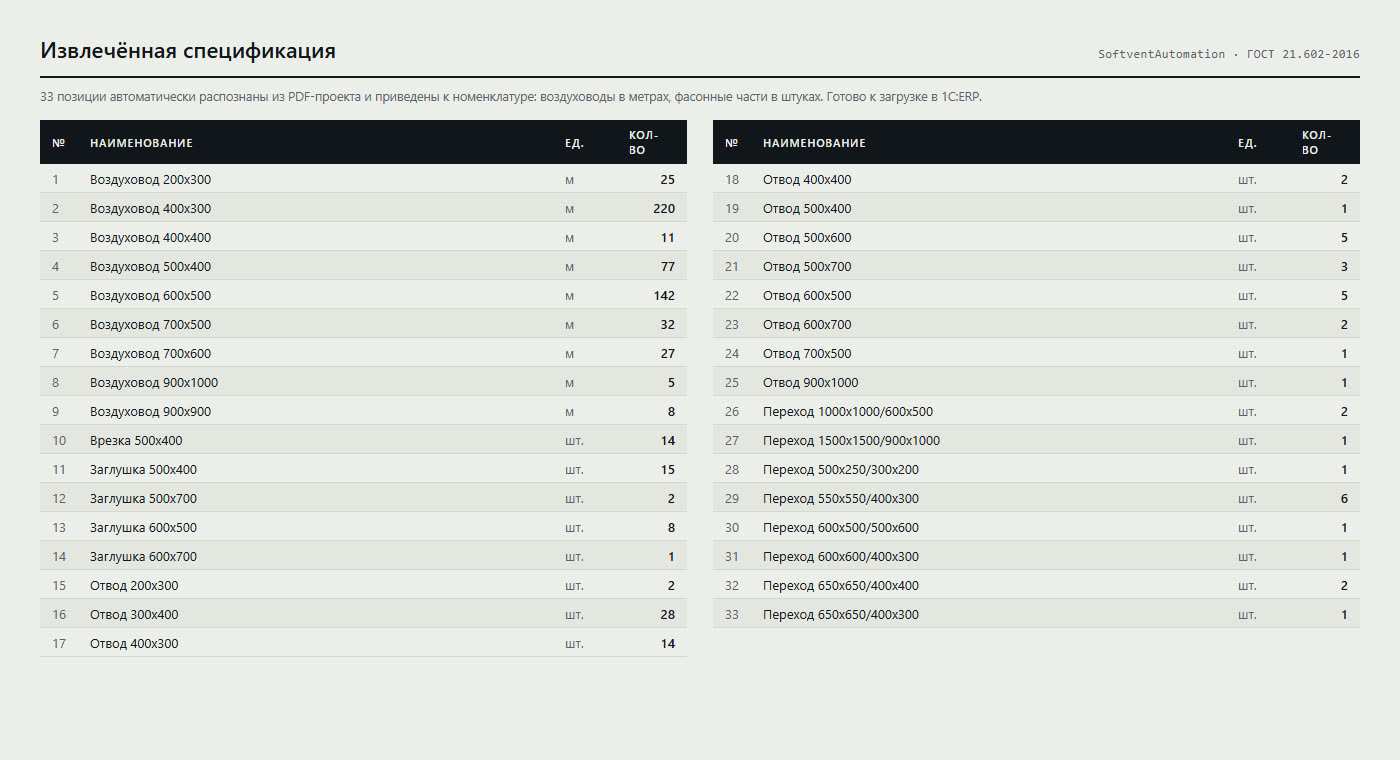
line items in the sample bill of materials: 9 duct sizes and 24 duct fittings
of duct run in the sample — 476 pieces of 1160 mm after conversion
| Line item | As designed | 1160 mm sections |
|---|---|---|
| Duct 400×300 | 220 m | 190 pcs |
| Duct 600×500 | 142 m | 123 pcs |
| Duct 500×400 | 77 m | 67 pcs |
| Duct 700×500 | 32 m | 28 pcs |
| Duct 200×300 | 25 m | 22 pcs |
| Duct 900×1000 | 5 m | 5 pcs |
Six of the nine duct rows. It shows plainly why the rounding goes up: 5 m of run is five sections, not four and a third.
06 · What is not finished
The limits of the prototype
This is a working prototype, not a delivered product. Everything below was verified against the source and the run logs, and is more useful said out loud than hidden.
-
On the test project the pipeline returns zero ducts. Two concrete reasons.
First, the diameter is written
ø160(U+00F8) while the regex looks for[ØDд]with capitalØ(U+00D8) — no match. Second, the gauge is spelled out as “0.5 mm thick” whereas the pattern expectsδ=0.5. The rows are found, the dimensions are not, and an item like that cannot be handed to the ERP. - The classifier loses the third bill-of-materials sheet. It carries no title, but it does carry the words “fan” and “characteristic”, so the system-parameters rule scores 4 against the bill of materials' 2 and the sheet is filed in the wrong bucket — the very sheet that holds every duct row. The fix is either to test the table header as well, or to compute the table signal before classification rather than after.
- Fourteen false positives out of sixteen. In one full run, the heuristic “six columns, ten rows and units of measure in the text” accepted drawing frames and title blocks as bills of materials. Parsing them breaks nothing, but it adds roughly two minutes to the run.
-
The rounding is an approximation.
int(x / 1160 + 0.99)is notmath.ceil: with a fractional part below 0.01 it returns one piece short. None of the observed volumes hit that window, butceilis the correct expression. -
Duct fittings are recognised but never converted. The patterns for bends, tees and
reducers exist and work, yet
convert_to_softvent_formatdrops anything whose description does not contain the word “duct”. Bends, branches, end caps and reducers are two thirds of the sample. -
Five project files are empty.
excel_parser.py,ui_mapper.py,converter.py,utils/logger.pyandconfig.yamlare zero bytes. Excel parsing is described in the README but never written — I read thetest_spec.xlsxsample by hand. The coordinate configuration from the README is likewise unwired; the values live as constants in theSoftventElementsclass. - The gauge-selection table exists only in the documentation. The rule “perimeter up to 1000 mm → 0.5; up to 1600 → 0.7; up to 2000 → 0.9; above that 1.0” is in the README but not in the code: Softvent picks the gauge itself when the field is left blank. That was a deliberate choice — do not duplicate someone else's business logic — but the README reads as if it were implemented, which needs correcting.
- The ERP automation is pinned to pixels. The coordinates depend on screen resolution, Windows scaling (exactly 100 % is required) and the window being maximised the same way every time. The controller never verifies that a value actually landed in a field — it types and moves on. The right answer is to read the form state as well as write to it; the prototype does not. The “full automation” menu entry honestly prints “under development”.
- There are no tests. Two demo functions run over hard-coded strings (“Rectangular duct 500×300 … δ=0.7 mm”). They prove the regular expressions are alive, but say nothing about behaviour on real sheets — as the results confirmed.
If I were continuing this project the order would be: first a corpus of real PDFs from
different design offices as fixtures with tests over them; then a dictionary of spellings
instead of single regular expressions (a diameter is Ø, ø,
D, д and the word “diameter”); and only then back to the UI
automation. A parser without a corpus always looks like it works — on the one file it was
written against.