Vector — a Go trainer
Lesson → exercise with real code execution → an exam where the answer is graded against rubrics rather than by self-assessment. An engineering breakdown: there is no live demo, and there cannot be one.
Year
June 2026
Role
The entire frontend: SPA architecture, design system, session engine, mock layer, build and static deployment
Stack
React 19, TypeScript 5.9 (strict), Vite 7, CodeMirror 6 with the Go grammar, motion, nginx, Docker
Outside my scope
The Go backend, the execution sandbox, the repetition scheduler and the judge prompts. The frontend was written against an agreed contract
01
The problem
Interview preparation breaks down in three places
The product was built for one specific person preparing for Go interviews. His feedback survives verbatim in the working notes — and nearly every technical decision below grew out of one of those sentences.
First: reading is not the same as being able to write.
Someone reads an article about net/http, nods along, and then
cannot produce twenty lines with a multiplexer and a test server under
interview pressure. The gap between “that makes sense” and “I can type it”
closes only at the keyboard.
Second: self-assessment lies. Courses offer a checkbox that says “understood”. Two weeks later the head is empty and the tracker is green. Any system where the learner grades themselves eventually becomes a generator of pleasant numbers.
Third: forgetting runs on a schedule, revision runs on mood. Material covered at the start of preparation has evaporated by the end, and nothing tells the learner what specifically needs refreshing today.
Three hard requirements followed, and they shaped the whole architecture: code must actually execute, the grade must come from somebody other than the learner, and revision must be scheduled, not chosen.
02
How it works
Two verification loops: a cheap deterministic one and an expensive language one
The central architectural decision is to keep them apart. Anything that can be verified by comparing strings is verified by comparing strings. The language model is called only where there is nothing to compare: a spoken explanation.
Loop A · deterministic
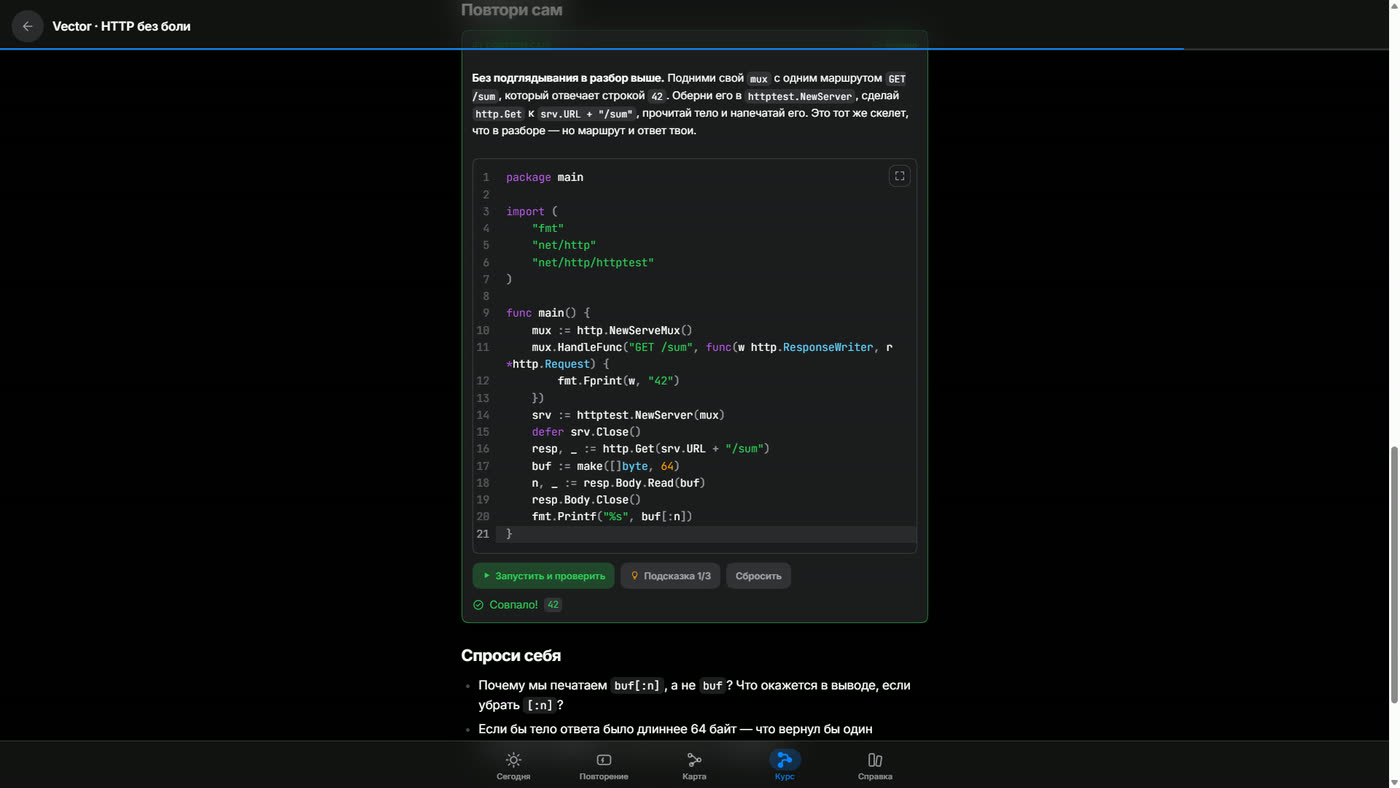
Run the code, diff the output
- 01 CodeMirror editor in the browser
- 02 POST the source to the Go backend
- 03 execution inside a sandbox
- 04 stdout / stderr come back
- 05 diff against the expected output
- 06 verdict: matched or not
Costs almost nothing, answers in seconds, cannot be wrong. The response
arrives as a structure — predictCorrect,
expectedOutput, diff — not as prose the client
has to parse by eye.
Loop B · language
The exam and the AI judge
- 01 question with no hints, timer running
- 02 spoken, open-ended answer
- 03 answer sent to the judge with the rubrics
- 04 rubric score, up to 4 points per question
- 05 reference breakdown: core / deeper / trap
- 06 a card enters memory — by verdict, not self-rating
Slow and not free, so it is invoked rarely and only during exams.
Hence the 120-second proxy_read_timeout in nginx: the
usual 60-second default cut long breakdowns off mid-response.
2.1
The exercise ladder: different levels mean different components, not different wording
Levels L0 through L5 are not a difficulty dial inside one template — they are distinct modes of interaction, each with its own component:
-
L0 — the lab. An editable example from the lesson, a Run
button, an Experiments panel (a list of “what if…” prompts delivered with
the exercise in an
experimentsfield), and a box for explaining the code in your own words. Credit is granted by an explicit “mark done and continue” button. - L1 — predict the output. The code is read-only; the learner first writes down what will be printed and only then runs it. A correct prediction fires its own toast, because the value of the exercise lies in the prediction, not in the act of running.
-
L3 — assemble from blocks. A purpose-built
ParsonsBuilder: the program is reassembled from shuffled lines, so syntax errors stop getting in the way of testing whether the learner understands the order of operations. -
L4 / L5 — full tasks. Tracked separately in the
achievement system:
clean-l4for passing on the first submission,boss-l5for closing a stage’s final task.
Hints are handed out in portions and counted — the exercise UI shows
Hint 1/3. That counter is not decoration: the number of hints
taken is what separates “solved it” from “peeked”.
2.2
Credit is granted only by an explicit button — an invariant recorded in the code
The easiest way to quietly ruin a learning product is to award progress for
scrolling past a screen. So after an audit, every call site of
markLectureRead and completeExercise was reviewed
one by one, and each turned out to hang off a button press: “read it — mark
done” on a lesson node, “mark done and continue” in L0, the check button in
L1 and L3.
Not a single call from onBack, from unmount, or from an effect.
The rule is written as an invariant comment in the two places where the
temptation is highest, so that the next edit cannot break it silently.
The same reasoning drove the button relabelling: “got it, next” became “mark done and continue”; “read — next” became “read it — mark done”. A label should name the consequence of the press, not the emotion.
2.3
Memory: the card is written by the judge’s verdict, not by the learner’s wish
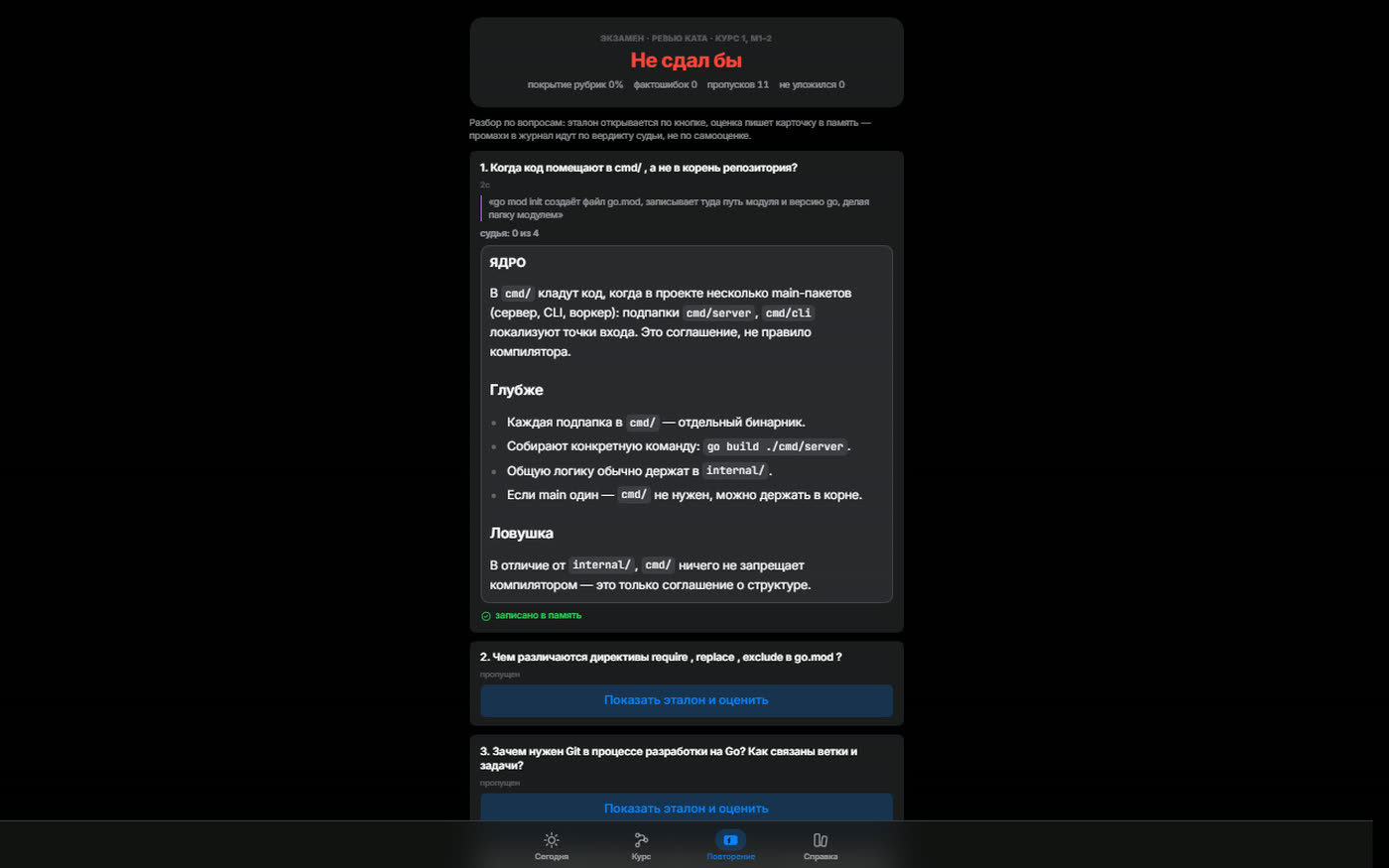
The exam is the data source for spaced repetition. An answer the judge has
broken down becomes a card (“written to memory” in the UI), and misses are
logged from the verdict rather than from self-rating. Scheduling uses the
FSRS interval algorithm on the backend; the frontend holds session marks
(lib/reviewmarks.ts) and a local progress cache
(lib/progressstore.ts).
Readiness for a review goal is computed with a deliberately blunt formula: half the weight for the share of mature cards, half for the share of completed practice items. The formula is crude, but it can be read aloud, and it explains why a ring shows exactly 17%. In a learning product, an elegant opaque metric does more harm than a coarse legible one.
The exam summary reports four quantities: rubric coverage, factual errors, skipped questions and time overruns. The final verdict is phrased in interview terms — “would not have passed” — rather than as a percentage, because a percentage is easy to forgive yourself.
2.4
Why revision is a separate application rather than a fifth tab
Revision has a different usage pattern. The main application is a half-hour session at a desk: lesson, editor, run, breakdown. Revision is ten minutes on a phone at an arbitrary point in the day. Merging them into one shell would force the phone to carry the whole course just to reach a queue of cards.
So review.html is a second entry point with its own
ReviewApp shell, its own nginx container and its own address on
the local network. The consequences that matter:
-
The heavy parts are shared. The session engine
(
TrainScreen,ReviewScreen,ExamScreen), the design system andmotionland in shared chunks of a single Vite build. Two applications, one codebase, onenpm run build. -
CORS never arises. nginx proxies
/api/to the backend over the internal Docker network, so the phone’s browser only ever talks to one origin. No preflight requests, noAccess-Control-*headers, and no time spent debugging either. -
Delivery differs by target. The main application is
compiled into the Go binary via
embed; the revision application is served as static files from nginx with gzip and a thirty-day immutable cache on Vite’s hashed assets.
2.5
A Go editor in the browser, and a playground with no grades attached
The editor is CodeMirror 6 with the Go grammar
(@codemirror/lang-go on top of Lezer) and a custom theme in
components/codetheme.ts: highlighting is built from the
application’s own design tokens rather than the default one-dark,
otherwise every code block would look pasted in from another product.
The standalone playground appeared after a direct request: give me somewhere to poke at code without being graded. What made it work:
- An entrance from everywhere. A compact pill button that opens the playground sits in the lower-right corner of every code block — including the read-only prediction code in L1, which previously could not be touched by design.
-
Fragments are wrapped automatically. A snippet without
package maingoes throughwrapInMainand becomes a compilable program. Without that, half the buttons would lead straight to a compile error. -
An empty file is a bad start. Entering with no saved draft
yields a starter template carrying three micro-steps in comments: run it,
change the text, add a
Println. The draft lives inlocalStorage, and “start over” restores the template rather than blanking the buffer. -
The “try this” panel. If the exercise ships its own
experiments, those are shown; if not, five universal challenges appear
(predict then run; break it deliberately and read the error aloud; insert
fmt.Printlnin the middle and trace the ordering; wrap it in a loop; trigger a panic on purpose and read the stack trace).
2.6
A backend-free mode, and a demo that cannot be mistaken for a live server
Waiting on the backend just to look at a screen costs hours. So the client
carries a parallel mock layer: with VITE_MOCK=1 (or when the
backend is unreachable) api/client.ts switches to
api/mock.ts, which has its own seeds, pure computation
functions (computeMilestone, buildWeek) and an
emulated code run.
Two principles keep a mock from rotting. First: one set of arrays. The stats sheet and the weekly sparkline read the same source, so yesterday’s figure agrees across both screens and a discrepancy in the mock surfaces as a real bug. Second: honest labelling. In mock mode a sticky banner sits above the interface, stating that the data is generated locally and no backend is attached. A demo should never look more convincing than it is.
One detail shows what realism costs: the run emulator originally detected an
HTTP server by matching the greeting text, so a plain Println in
the playground falsely printed server output. It now matches on the
ListenAndServe call instead.
2.7
Interface discipline: races, focus, hit targets
A trainer is a keyboard-driven application used at speed. That produced a set of decisions nobody notices while they are working:
-
Double submit from mouse plus key. The
inFlightlock is auseRefset synchronously, before theawait, not in state. State updates a render later, and the second event arrives sooner than that. - Hotkey collisions between phases. A 260 ms debounce on session phase changes stopped a fast double keypress from skipping a step.
-
Re-entering a checkpoint. The training screen’s
keyis derived from the set ofcardIds, so the session genuinely restarts instead of resuming with state belonging to a different card set. -
Screen transitions. View Transitions with named groups:
only the
screengroup animates, while the tab bar and the demo banner stay put. The default root cross-fade produced double exposure — the learner described it as sloppy. -
Accessibility. Focus trapping in modal sheets (remember
the trigger, cycle
Tab, restore focus on close), hit targets of at least 44×44 px,content-visibility: autoon long lists, andprefers-reduced-motionrespected — confetti included.
03
Screens
What both loops look like in place
On the left, deterministic verification; on the right, the judge’s verdict with a reference breakdown. Both were captured from a working build against a live backend. The interface is in Russian — it was built for one Russian-speaking learner.
04
Code
Four fragments where the structure is visible
Not the longest files, but the ones where a decision is legible end to end: the build, navigation, transitions and delivery. Comments are translated from the Russian originals.
server: {
  port: 5173,
  proxy: {
    // dev: /api and /healthz go to the Go backend — no CORS.
    // With no backend (or VITE_MOCK=1), client.ts switches
    // itself to the built-in mock layer.
    '/api':     { target: 'http://localhost:8090', changeOrigin: true },
    '/healthz': { target: 'http://localhost:8090', changeOrigin: true },
  },
},
build: {
  outDir: 'dist',
  target: 'es2022',
  // CodeMirror + motion are sizeable, and this is a
  // single-user app — raise the warning threshold.
  chunkSizeWarningLimit: 1200,
  // Two entry points in one build:
  //  index.html  → the main app (embedded into the Go binary);
  //  review.html → the revision app (served by nginx).
  // Shared chunks (motion, design system, session engine)
  // are reused across both.
  rollupOptions: {
    input: { main: 'index.html', review: 'review.html' },
  },
},/** Deep entry into a specific track node (deep link from Today). */
export interface PathFocus {
pathSlug: string;
stepKind: PathStepKind;
ref: string;
}
/** A tab transition intent with optional focus on an entity. */
export interface NavIntent {
tab: TabId;
exerciseId?: string;
pathFocus?: PathFocus; // open a track node on the Course tab
reviewSlug?: string; // end of a track → straight to a review goal
}
const navigate = useCallback((intent: NavIntent) => {
withViewTransition(() => {
setTab(intent.tab);
setFocusExercise(intent.exerciseId ?? null);
setPathFocus(intent.pathFocus ?? null);
setReviewFocus(intent.reviewSlug ?? null);
});
}, []);/* ONLY the screen group animates. Interface layers
(background, tab bar, demo banner) stay static: the default
root cross-fade with plus-lighter caused double exposure,
and the bar should never flicker at all. */
::view-transition-old(screen) { animation: vt-out .26s cubic-bezier(.32,.72,0,1) both; }
::view-transition-new(screen) { animation: vt-in .26s cubic-bezier(.32,.72,0,1) both; }
::view-transition-old(root), ::view-transition-new(root),
::view-transition-old(tabbar), ::view-transition-new(tabbar),
::view-transition-old(demo-banner), ::view-transition-new(demo-banner) {
animation: none;
}
/* A seatbelt for paint order. */
::view-transition-group(screen) { z-index: 1; }
::view-transition-group(tabbar),
::view-transition-group(demo-banner) { z-index: 10; }root /usr/share/nginx/html;
index review.html;
# ── API → the Vector backend (the «app» service on the same network) ──
location /api/ {
proxy_pass http://app:8080/api/;
proxy_http_version 1.1;
proxy_set_header Host $host;
proxy_set_header X-Forwarded-For $proxy_add_x_forwarded_for;
proxy_read_timeout 120s; # a judge breakdown exceeds the default
}
# ── Vite's hashed assets: cache them hard ──
location /assets/ {
expires 30d;
add_header Cache-Control "public, immutable";
try_files $uri =404;
}
# ── SPA: any unknown path → review.html ──
location / { try_files $uri $uri/ /review.html; }05
Numbers
The size of the frontend
The module inventory was reconstructed from
tsconfig.app.tsbuildinfo — the file list TypeScript recorded
during the last successful incremental build. It is the project’s actual
graph, not an estimate.
TypeScript modules under web/src: 69 .tsx and 15 .ts
design-system components, from Sheet and Toast to ProgressRing and Sparkline
screen modules across 11 folders: course, reference, practice, review, Today, training
lib modules: contexts, sound, speech, progress, animation springs, View Transitions
API-layer modules — types, client, mock: the contract, the transport and its stand-in
entry points built by a single command, with shared chunks reused between them
modules in the production Vite graph; the build finishes in about two seconds
tsc errors in strict mode with noUncheckedIndexedAccess and noUnused*
tabs in the main application: Today, Revision, Map, Course, Reference
stages on a single track, from the first program to interview readiness
achievements, each carrying its own how-to-earn-it text; 5 unlocked at the demo’s start
the top milestone on the rank scale, running from the start to interview-ready
proxy timeout for a judge response, sized for a long rubric breakdown
debounce on session phase changes, curing the fast-hotkey collision
minimum hit-target edge on the back and close controls
immutable cache on Vite’s hashed assets in nginx
06
What is not here
Limitations, technical debt and missing pieces
An honest list beats a polished one: it shows that the author knows the boundaries of the work and is not passing a work in progress off as a finished product.
-
There is no live demo, and there will not be one
The server side executes user-submitted Go inside a sandbox and calls out to an external AI judge. Neither can be served as static files from GitHub Pages: both need a running process, isolation, and CPU and wall-clock limits. That does not belong on public static hosting, so this page explains the machine instead of pretending to be it.
-
The sources arrived incomplete
Only
App.tsx,main.tsx,review-main.tsxand the stylesheets survive underweb/src; theapi/,components/,lib/andscreens/folders are missing, so the project does not build in this state. The module inventory and its structure were reconstructed fromtsconfig.app.tsbuildinfoand the working reports — every number on this page comes from there, none of them is an estimate. -
Not a single automated test
There is no test runner in the project at all. The definition of done was two build gates —
tsc -bin strict mode andvite build— plus manual Playwright passes over the key flows in mock mode. That held for a single-user trainer, but a pure function likecomputeMilestoneis the first thing that should be under unit test. -
Half the product was not my scope
The execution sandbox, the FSRS scheduler, the rubrics and judge prompts, and the achievement logic all live in the Go backend, written by another party. The frontend worked against an agreed contract: field types, achievement identifiers and the milestone table were fixed separately. What I own here is the interface and the client architecture, not the verification engine.
-
A stale comment in the build config
In
vite.config.tsthe comment promises a proxy to port 8080 whiletargetpoints at 8090: the backend port moved and the comment did not follow. A small thing, but small things like this are what later cost an hour of working out why the dev proxy is not connecting. -
No dedicated stats screen
Tapping the weekly sparkline opens a modal sheet with a per-day breakdown rather than a full analytics screen — a deliberate choice in favour of honest navigation over an invented tab, though the sheet will get cramped as the product grows. A couple of dead exports such as
PLAYGROUND_DEFAULTare still sitting in the same area.